

Cancel Anytime: USM Coffee Subscription Policy Explained
Table of Contents
- Understanding USM Coffee's Cancel Anytime Policy
- How to Cancel Your USM Coffee Subscription
- Notice Period Requirements and Order Processing Cut-off Times
- Pause vs. Cancel Coffee Subscription: Which Is Right for You
- USM Coffee Subscription Cancellation Email Template
- Subscription Cancellation Laws and FTC Regulations
- Your Refund and Return Policy Rights
- Troubleshooting Common Cancellation Errors
Last Updated: August 9, 2026
Understanding USM Coffee's Cancel Anytime Policy
A cancel anytime policy is a subscription agreement that allows customers to terminate their recurring delivery service without penalties, long-term contracts, or advance notice requirements. USM Coffee's cancel anytime policy gives you complete control over your coffee subscription, meaning you can pause, modify, or cancel your recurring delivery whenever your needs change.
This flexibility matters because subscription services often trap customers in rigid commitments. You're not locked in. If your preferences shift, your budget tightens, or you simply have too much coffee on hand, you can stop your recurring charge immediately through your account dashboard.
Understanding how your subscription works and what your actual rights are under the law protects you from unexpected charges and gives you confidence in your purchase decision. Below, we'll walk you through exactly how to cancel, what alternatives exist, and how USM Coffee's approach compares to industry standards.
How to Cancel Your USM Coffee Subscription
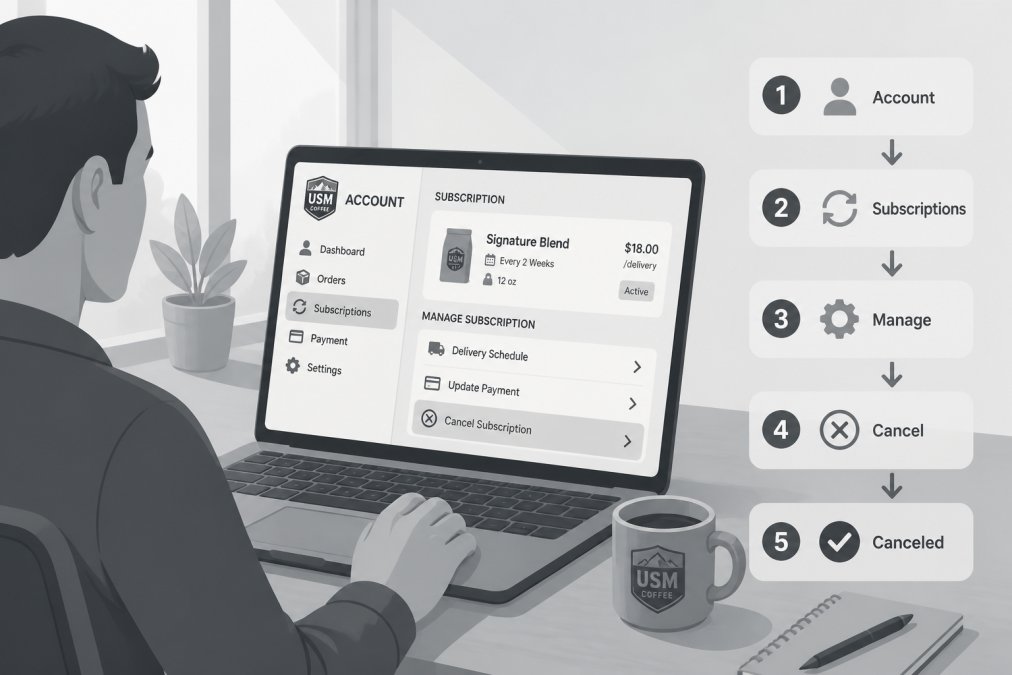
Canceling your USM Coffee subscription takes fewer than three minutes. The process is intentionally straightforward because USM Coffee believes cancellation should be as easy as signup.
Step 1: Log Into Your Account Dashboard
Start by visiting USM Coffee's website and signing into your customer account using your email and password. Your account dashboard is where all subscription management happens. This is your central hub for viewing order history, managing billing dates, and accessing cancellation options.
Once logged in, you'll see your account overview. Look for a section labeled "Subscriptions" or "My Orders." This section displays all active recurring deliveries tied to your account, including roasting schedules, delivery intervals, and next billing dates.
Step 2: Navigate to Subscription Settings
Click on the subscription you want to cancel. USM Coffee displays each subscription separately if you have multiple recurring orders (for example, one for whole bean and another for ground coffee).
In the subscription detail page, you'll see your current roast date, delivery frequency, and billing information. Look for a button or link labeled "Manage Subscription," "Subscription Settings," or "Cancel Subscription." The exact label may vary slightly, but the option is always visible on this page.
Step 3: Submit Your Cancellation Request
Click the cancellation option. A confirmation screen will appear asking you to confirm that you want to cancel this recurring delivery. USM Coffee may offer alternatives at this point: you can pause the subscription instead of canceling, skip the next delivery, or modify your delivery frequency.
If you're certain you want to cancel completely, confirm your request. You'll receive an immediate cancellation confirmation on screen, followed by an email confirmation to your registered email address. The cancellation takes effect immediately. No future charges will be processed, and your next scheduled delivery will not ship.
Notice Period Requirements and Order Processing Cut-off Times
USM Coffee's cancel anytime policy means there is no formal notice period. You can cancel immediately without waiting days or weeks for the cancellation to take effect.
However, timing matters for your next billing date and roasting schedule. Coffee subscriptions operate on a roasting and fulfillment cycle. Once your coffee enters the roasting process, it's difficult to stop that batch from shipping.
Most coffee subscription services, including USM Coffee, process orders and begin roasting 24-48 hours before your scheduled delivery date. If you cancel after this window closes, your next shipment may already be roasting or packed for fulfillment.
Check your account dashboard to see your exact roasting date and order processing cut-off time. This information appears on your subscription detail page. If you cancel before the cut-off, you avoid the charge entirely. If you cancel after the cut-off, the order processes as scheduled, and you'll receive that shipment.
This is where pausing becomes valuable. Instead of canceling and losing that order, you can pause your subscription to skip a single delivery. Your recurring charge pauses, and your next roast date shifts forward by one cycle.
According to Federal Trade Commission guidance on negative option billing, companies must clearly disclose their order processing cut-off times and billing dates. USM Coffee displays this information in your account settings and in your order confirmation emails.
Pause vs. Cancel Coffee Subscription: Which Is Right for You
The decision between pausing and canceling depends on whether you want to stop temporarily or permanently.
When to Pause Your Subscription
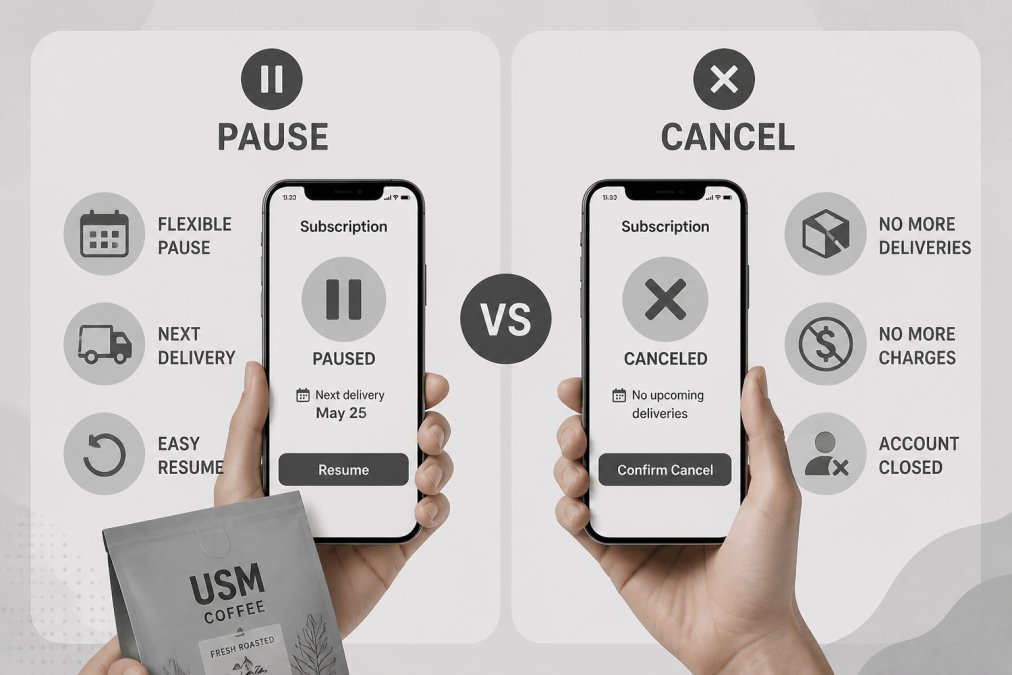
Pause your USM Coffee subscription if you have too much coffee on hand but still want the service long-term. Pausing freezes your recurring charge without canceling your account. Your subscription remains active in your account, and you can resume deliveries whenever you're ready.
Common reasons to pause include:
- You have a backlog of coffee beans from previous orders
- You're traveling and won't be home for deliveries
- Your budget is tight this month, but you'll want to resume next month
- You're experimenting with a different roast profile and want to use up your current stock first
- You're taking a break from coffee temporarily (though this is rare among enthusiasts)
Pausing typically lasts one delivery cycle. After your pause period ends, your subscription resumes automatically on your next scheduled roasting date. You can extend the pause if needed before the resume date arrives.
When to Cancel Completely
Cancel your USM Coffee subscription if you don't plan to reorder in the foreseeable future. Cancellation removes your subscription from your account entirely. Your recurring charge stops, and you won't receive future deliveries.
Reasons to cancel include:
- You've found a different coffee source you prefer
- Your coffee consumption has decreased significantly
- You want to switch to buying coffee in bulk from a local roaster
- Budget constraints require cutting discretionary spending
- You're dissatisfied with a specific roast or blend and don't want to continue
Cancellation is permanent, but it's not irreversible. You can always create a new subscription later if you change your mind. However, you won't resume your old subscription, you'll place a new order from scratch.
The key difference: pause is temporary and maintains your subscription relationship. Cancel is final and ends your recurring delivery.
USM Coffee Subscription Cancellation Email Template
If you prefer to cancel by email rather than through your account dashboard, here's a template you can customize and send to USM Coffee's support team:
Subject: Request to Cancel My USM Coffee Subscription
Hello,
I'd like to cancel my recurring USM Coffee subscription effective immediately.
Account Details:
- Email address: [your email]
- Subscription ID (if available): [found in your account dashboard]
- Reason for cancellation: [optional, helps USM Coffee improve]
Please confirm that my cancellation has been processed and that no future charges will be applied to my account.
Thank you, [Your Name]
Email this template to USM Coffee's customer support address (found on their website under "Contact Us"). You'll receive a confirmation email within 24 hours.
Email cancellation takes slightly longer than using your account dashboard, typically 24-48 hours to process. For immediate cancellation, use the dashboard method instead.
Subscription Cancellation Laws and FTC Regulations
Your rights as a coffee subscription customer are protected by federal law. The Federal Trade Commission's Negative Option Rule requires all subscription services to obtain clear, affirmative consent before charging recurring fees and to make cancellation as easy as signup.
This rule applies to USM Coffee and all other coffee subscriptions. The FTC specifically requires:
- Clear disclosure of all material terms before you sign up (price, frequency, auto-renewal terms)
- Simple, easy-to-use cancellation mechanisms
- No delays or obstacles to cancellation
- Cancellation confirmation sent to your email
- No charges after cancellation takes effect
USM Coffee complies with these requirements. Their cancel anytime policy aligns with FTC standards because cancellation is immediate, requires no notice period, and is accessible directly from your account.
Some states have additional protections. California's Consumer Legal Remedies Act and similar state laws require even stricter compliance with negative option billing. If you're a California resident, you have additional rights to cancel without penalty and to receive clear billing information.
If a company violates these rules, for example, by continuing to charge after you cancel or by making cancellation deliberately difficult, you can file a complaint with the FTC's Consumer Sentinel Network, which investigates violations and pursues enforcement action.
Your Refund and Return Policy Rights
Cancellation and refunds are separate. Canceling your subscription stops future charges, but it doesn't automatically refund previous purchases.
USM Coffee's refund policy typically covers:
- Defective or damaged shipments: If your coffee arrives damaged, stale, or defective, USM Coffee issues a replacement or refund regardless of your subscription status.
- Cancellation refunds: Canceling your subscription does not refund previous orders. Each shipment is a separate purchase. Once your coffee ships, it's considered fulfilled and non-refundable unless there's a quality issue.
The key principle: subscription fees are non-refundable once the roasting cycle begins. However, if you cancel before your roasting date, you avoid the charge entirely.
Review USM Coffee's full refund policy on their website or in your terms and conditions. Policies vary slightly by state, so your specific rights depend on where you live.
Troubleshooting Common Cancellation Errors
Even though USM Coffee's cancellation process is straightforward, occasional issues arise. Here's how to resolve the most common problems.
Error: "Cancellation Failed" or "Unable to Process Request"
If your cancellation doesn't go through, try these steps:
- Clear your browser cache and cookies, then log back into your account
- Try a different web browser (Chrome, Firefox, Safari)
- If you're on a mobile device, try accessing the desktop version of the website
- Check that your account credentials are correct, incorrect passwords prevent access to subscription settings
If the error persists, contact USM Coffee support. Provide your account email and subscription ID. Support can cancel manually within 24 hours.
Error: "You Don't Have an Active Subscription"
This message appears if your subscription is already canceled, paused, or doesn't exist. Check your email for a previous cancellation confirmation. If you're certain you have an active subscription, contact support with your account details. They'll verify your subscription status and cancel if needed.
Problem: Charged After Cancellation
If you see a charge after canceling, don't panic. This usually happens because:
- Timing issue: Your cancellation processed after your roasting date cut-off. Your next shipment was already in production. Contact support to halt it if possible, or accept the shipment and cancel again for the following cycle.
- Delayed processing: Your cancellation request took 24-48 hours to process. A charge went through during that window. Contact support for a refund.
- Account confusion: You have multiple subscriptions and canceled the wrong one. Check your account for other active subscriptions.
Contact USM Coffee support immediately with your order number and cancellation confirmation email. They'll investigate and issue a refund if the charge was made in error.
Problem: Can't Find the Cancel Button
The cancellation option is always in your subscription management page. If you can't find it:
- Log into your account and click "My Subscriptions" or "Active Orders"
- Click on the specific subscription you want to cancel (not your overall account)
- Look for buttons labeled "Manage," "Settings," "Options," or "More"
- The cancel option is usually near pause or skip options
If it's still not visible, your subscription may already be canceled or paused. Check your email for confirmation. If you need help, email support with a screenshot of what you're seeing.
Problem: Pause Button Works But Cancel Button Doesn't
This rare issue happens when your account has a technical glitch. Use the email cancellation template provided above. Email cancellation bypasses the dashboard and processes through support.
Canceling your USM Coffee subscription should be friction-free. Their cancel anytime policy removes the common barriers that trap customers in unwanted recurring charges. Whether you're pausing temporarily, canceling permanently, or troubleshooting a technical issue, the process is designed to respect your choice and protect your account.
Frequently Asked Questions
Can I really cancel my USM Coffee subscription anytime without penalties?
Yes. USM Coffee's cancel anytime policy means you can terminate your subscription at any point without cancellation fees or long-term commitment. However, you must submit your cancellation request before the order processing cut-off time for your next scheduled billing date to avoid being charged for that delivery. Once a charge has been processed and your order enters the fulfillment process, that shipment cannot be canceled. Check your account dashboard for your specific notice period deadline.
What's the difference between pausing and canceling a coffee subscription?
Pausing temporarily stops your recurring delivery while keeping your account active and your preferences saved. You can resume anytime. Canceling permanently ends your subscription and removes your recurring charge from automated billing. Choose pause if you have too much coffee on hand or need a short break; choose cancel if you're done with the service. Pausing is ideal for managing delivery intervals without losing your account settings and roasting preferences.
Does the FTC regulate coffee subscription cancellations?
Yes. The FTC's Negative Option Rule requires subscription services to obtain clear, affirmative consent before charging, make cancellation easy, and honor cancellation requests promptly. USM Coffee must honor your cancellation request before the next billing date and provide a cancellation confirmation. If you encounter issues canceling through your account portal, contact customer support immediately, the FTC requires companies to process cancellations without unnecessary delays or obstacles.
How do I write a cancellation email if I can't cancel through my account?
Address your email to USM Coffee's customer support team with the subject line 'Subscription Cancellation Request.' Include your account email, full name, order number, and the date you want the cancellation to take effect. State clearly: 'I request immediate cancellation of my recurring coffee subscription effective [date].' Request written confirmation of your cancellation. Keep a copy for your records. Send it well before your next billing date to ensure it's processed in time. Most services respond within 24-48 hours.
What happens to my account after I cancel?
After cancellation, your recurring charge stops and you'll receive no further shipments. Your account credentials and order history remain accessible in your customer portal for reference. If you had any prepaid balance or credits, contact support about refund eligibility, this depends on your service agreement terms. You can reactivate a subscription at any time by logging back into your account dashboard and selecting a new subscription tier and delivery interval.
If cancellation doesn't work as expected or you have questions about your subscription terms, reach out to USM Coffee's support team directly. They handle subscription management requests within 24 hours and can address any concerns about billing dates, notice periods, or account settings. USM Coffee's commitment to transparent, hassle-free cancellation means you're never locked into a subscription you don't want.